Metadata Privacy: What It Is and How to Protect Yourself
What your photos, documents and messages quietly say about you — and the practical steps that stop it.
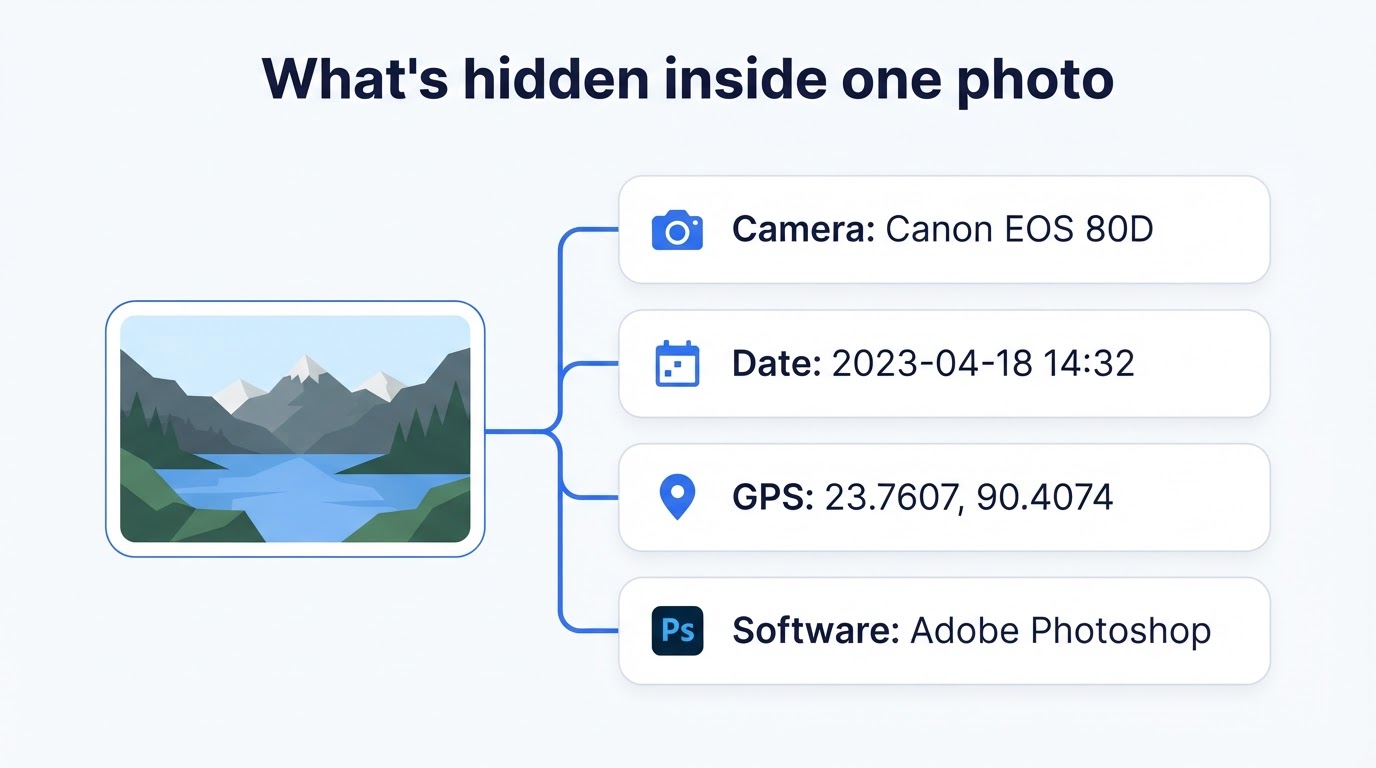
You take a photo of your new kitten and text it to a friend. The picture shows a kitten. The file, though, may also record the exact latitude and longitude of your living room, the minute you pressed the shutter, and the serial number of the phone in your hand. None of that is visible, and you never agreed to send it.
That gap — between what a file appears to show and what it actually carries — is the whole subject of metadata privacy. Metadata is often described as "data about data": information that describes other information. It is genuinely useful, which is why it exists. It is also remarkably revealing when it travels further than you expected.
This guide covers what the term means, the metadata you generate every day, the risks that actually matter, how the major platforms behave, and a step-by-step routine — plus a test we ran ourselves.
What Is Metadata Privacy?
Metadata is data that describes other data. A photo's holds the camera, the date and often the GPS location. A document's holds the author's name and the editing history. A phone call's holds who called whom, when, and for how long — not the conversation, but everything around it.
Metadata privacy, then, is about controlling that second layer: what gets created about you, who collects it, and how long it is kept. It needs its own name because metadata behaves differently from content — small, highly structured, easy to search at scale, and often exempt from the protections people assume apply to the message itself.
Metadata privacy in one sentence: it is the control you have over the hidden descriptive data attached to your files and activity — such as a photo's GPS coordinates, a document's author name, or a record of who you contacted and when — and over what that data reveals about where you live, where you go and who you know.
The asymmetry is the point: you can read an email you wrote, but not the trail it generated. As the Office of the Privacy Commissioner of Canada notes, that trail can be more informative than the content once enough of it accumulates.
Types of Metadata (With Examples)
Photo and video metadata (EXIF and GPS)
Cameras and phones write a block called EXIF at capture: make and model, lens, sometimes a body serial number, the exact date and time, exposure settings, and — if location services were on — GPS latitude and longitude. Editing software then adds its own name and timestamps.
Document metadata
Word, Excel, PowerPoint and PDF files store the author's name, the organisation the software was registered to, how long the file was edited, and often previous editors. Tracked changes and hidden comments survive too, so a document may carry a discussion you thought was gone.
Web and app metadata
Every request your browser makes carries an IP address, a user-agent string describing your device, a timestamp, and whatever cookies are in play. Individually trivial; combined, they are the raw material of online tracking — as the Electronic Frontier Foundation has long documented in its work on browser fingerprinting.
Communication metadata
This is the category that drove metadata into public debate: who contacted whom, at what time, for how long, and from roughly where — without recording what was said. The University of Michigan's Safe Computing guidance is a useful reminder that patterns of contact are themselves sensitive information, independent of message content.
Why It Matters: The Real Risks
Your location can be exposed
GPS in photos is the clearest risk of all, because it needs no interpretation. Coordinates accurate to a few metres, pasted into any map, land on a specific building. A photo taken at home and posted to a marketplace listing can therefore publish an address you never typed.
Patterns reveal more than single points
One timestamped location is an anecdote. Fifty are a routine. Aggregation turns scattered records into a map of where you sleep, work, worship and travel, and of who you were near — the effect the Canadian Privacy Commissioner's overview highlights, where data that seems innocuous in isolation becomes sensitive in volume.
Device and browser fingerprinting
A camera body serial number in EXIF, or a particular combination of browser, fonts and screen size, forms a signature. It can link activity you believed was separate — different accounts, sites and pseudonyms — back to one device, and therefore one person. Test your own browser with the EFF's Cover Your Tracks.
Documents leak more than you think
Sending a CV, a tender response or a legal draft can disclose the author of whoever created the template, the internal filename, and comments left in the margins. The US Cybersecurity and Infrastructure Security Agency and the UK Information Commissioner's Office both treat careless document handling as a genuine disclosure route, not a theoretical one.
Where Metadata Hides (and Who Sees It)
Metadata is not confined to photos. It accumulates in:
- Photos and videos — EXIF, GPS, XMP, IPTC, colour profiles.
- PDFs and Office files — author, company, revision history, tracked changes, comments.
- Email — headers recording the route a message took, the sending client, and timestamps.
- Cloud backups — the original, uncleaned file usually syncs before you ever think about sharing it.
- Social platforms — the full original reaches their servers even when the public copy is stripped.
Two practical notes. Screenshots generally drop photo metadata, because a screenshot is a fresh capture of your screen rather than a copy of the file. And platforms strip some fields but not all, with behaviour that is not stable over time — which is why cleaning a file yourself beats trusting a platform's settings.
Our Own Test: What Actually Survived
Most articles on this topic explain metadata in the abstract. We wanted to measure it, so we ran a test ourselves rather than assume the answer.
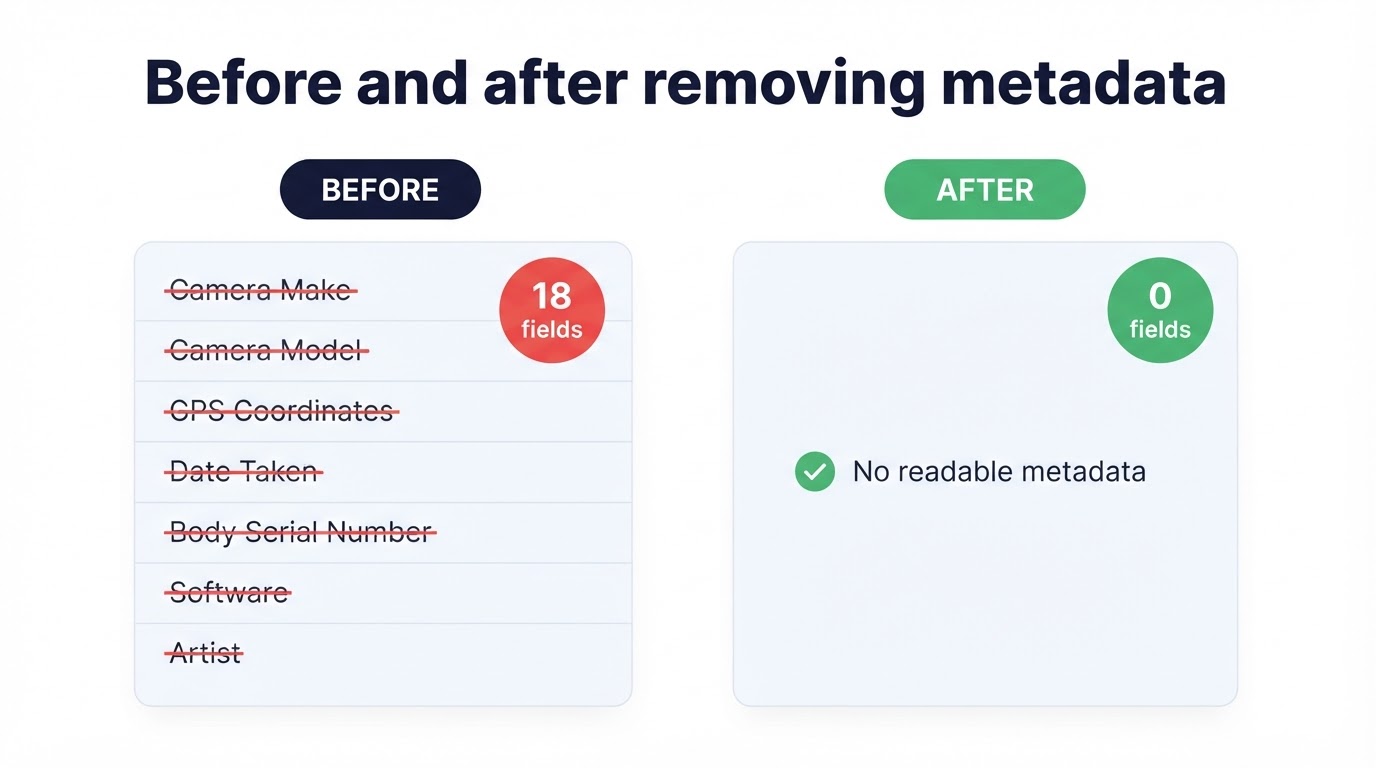
Method. We built a single JPEG carrying a known, complete EXIF payload — 18 readable fields, including camera make and model, lens, body serial number, two timestamps, software, artist and full GPS coordinates. We pushed it through five pipelines that mirror what happens to a shared image, then re-parsed each output.
| Pipeline applied | Readable fields left | What remained |
|---|---|---|
| Original file (baseline) | 18 | Camera, lens, serial, dates, software, artist, GPS |
| Re-encode to JPEG | 1 | Only an ICC colour profile |
| Re-encode to PNG | 0 | Nothing readable |
| Re-encode to WebP | 1 | Only an ICC colour profile |
| Resize to 50%, save as JPEG | 1 | Only an ICC colour profile |
| Screenshot-style re-render | 0 | Nothing readable |
What we learned. Every pipeline removed all 18 original fields — and none merely blanked the values. The EXIF container itself was gone, because each output was written from decoded pixels rather than edited in place. Camera, serial, timestamps and GPS were absent, not empty.
One result surprised us: the JPEG and WebP outputs each gained one field that was not in the original — an ICC colour profile added by the browser while encoding. It describes colour, not you, so it carries no privacy weight, but it shows why "zero metadata" is a sloppy claim.
Scope, stated plainly. These five pipelines were run locally in a browser. They show what survives a re-encode, the operation most "resize for upload" processes perform. They are not a measurement of any named company's servers.
How to Protect Your Metadata Privacy (Step by Step)
You do not need technical skill for any of this. Here is how to protect your metadata, in rough order of how much difference each step makes:
- Remove metadata from photos before sharing them. The highest-value habit, because photos carry the most sensitive field of all. You can remove metadata from an image for free with our browser-based tool — it reads the file on your device, shows every field it found, and writes a clean copy. Nothing is uploaded.
- Turn off location tagging in your camera app. Prevention beats cleanup. On iPhone: Settings, Privacy & Security, Location Services, Camera, Never. On Android: open the Camera app's settings and switch off location or geotagging. New photos then never get coordinates.
- Inspect documents before sending them. In Microsoft Word: File, Info, Check for Issues, Inspect Document — this finds and removes author names, comments and tracked changes. Do it before a CV or proposal leaves your machine.
- Review app permissions regularly. Any app with location access can generate a location trail. Go through the list on your phone and revoke access for anything with no genuine need for it.
- Reduce what your browser gives away. Use a browser with tracking protection, keep your extension list short, and avoid unusual font or display tweaks that make your setup distinctive. The EFF's Cover Your Tracks shows how identifiable you are.
- Share a screenshot instead of the original. When someone only needs to see the picture, a screenshot sheds photo metadata — in our test it left nothing readable. You lose resolution, so treat it as a convenience, not a substitute for cleaning.
- Assume nothing about platform behaviour. Clean the file before upload rather than relying on a service to strip it. That way the protection does not change when their settings do.
- Verify anything genuinely sensitive. If a file relates to safety, journalism or a legal matter, check the cleaned output with a second, independent viewer before publishing.
How Major Platforms Handle Metadata
Platform behaviour changes and none of these companies guarantees it in writing, so treat the table as orientation, not a promise. The safe assumption in every row: the original you upload arrives intact on their servers.
| Service | Typical behaviour on the public copy |
|---|---|
| Facebook / Instagram | Images are re-encoded and resized, so most EXIF is not served to viewers. The upload itself still carries it. |
| Photos sent as standard images are compressed, which drops most EXIF. Files sent as "document" keep the original intact. | |
| X (Twitter) | Uploaded images are processed and re-encoded, so EXIF is generally not available in the displayed image. |
| Attachments are normally delivered byte-for-byte. Assume full metadata arrives, and clean before attaching. | |
| Google Photos | A storage and library service: it deliberately keeps EXIF, including dates and location, because features depend on it. |
The pattern is worth internalising: publishing services re-encode, stripping metadata as a side effect of compression, while storage services preserve it on purpose. Cleaning the file yourself is the only step that behaves the same everywhere.
What the Law Says
Regulators increasingly treat metadata as personal data when it can be tied to a person — directly or by combination with something else.
- UK GDPR / EU GDPR. The Information Commissioner's Office explains that personal data is any information relating to an identifiable person, and that identifiability can arise from combining data. An IP address or a location trail can therefore qualify.
- CCPA / CPRA (California). The California Attorney General's office describes personal information broadly, including identifiers and geolocation data, and grants rights to know and to delete.
- Technical guidance. The US NIST SP 800-122 guide on protecting personally identifiable information makes a similar point from an engineering angle: data that is not obviously identifying can become so when linked.
None of this is legal advice. The practical takeaway is simply that "it's only metadata" is not a reliable reason to treat it casually.
Frequently Asked Questions
Is metadata a privacy risk?
Yes, in two ways. A single field can expose something directly, such as GPS coordinates in a holiday photo. More subtly, combining many small records builds a picture of your movements and contacts — the aggregation effect the Canadian Privacy Commissioner highlights.
What metadata do photos contain?
Typically camera make and model, lens and sometimes a body serial number, the capture date and time, exposure settings, the software that last saved the file, and GPS coordinates if location was on. Editing tools may add XMP, IPTC and ICC blocks too.
Does removing metadata reduce image quality?
Slightly, for JPG and WebP, because those formats are re-compressed when the file is rebuilt. A high quality setting keeps the difference invisible in normal viewing, and PNG output stays lossless. Keep your original as the archive master and share the cleaned copy.
Do social media platforms remove metadata?
Most strip or ignore much of the EXIF in the copy they display publicly, but the original upload still reaches their servers complete with GPS. Behaviour differs between services and changes without notice, so cleaning before you upload is the only part you control.
How can I check what metadata is in my file?
On Windows, right-click the file, choose Properties, then Details. On macOS, open it in Preview and choose Tools, then Show Inspector. For a full field-by-field report without installing anything, use a browser-based metadata viewer that works locally.
Is metadata personal data under GDPR?
It can be. The UK Information Commissioner's Office explains that personal data is any information relating to an identifiable person, and that identification can come from combining data. An IP address or location trail can therefore fall within scope.
Can metadata be recovered after deletion?
Not from a file rebuilt from scratch, because the container is absent rather than blanked. But copies elsewhere still hold it — the original on your phone, a cloud backup, or a version already sent. Clean the copy you actually share.
Does taking a screenshot remove metadata?
Largely yes. A screenshot is a new image captured from your screen, so the original camera and GPS fields are not carried over — in our test it left no readable EXIF at all. It is blunt, though: you lose resolution and the visible content is unchanged.
Conclusion
None of this is an exotic concern. It is the ordinary consequence of using devices that document their own work: photos that record where they were taken, documents that remember who wrote them, services that log who spoke to whom. Most of it is harmless, and all of it is easier to manage once you know it is there.
The practical core is short. Turn off camera location tagging so new photos start clean. Inspect documents before they leave your machine. Review which apps really need your location. And clean images yourself rather than hoping a platform does it — our test showed a re-encode removes every identifying EXIF field, but also that what survives depends on the pipeline.
Start with the photo you were about to post. Remove metadata from an image for free in your browser — no sign-up, no upload, and the file never leaves your device. For background, our guide to what image metadata is covers EXIF and GPS field by field, and our privacy policy sets out what this site does and does not collect.
Sources
- Office of the Privacy Commissioner of Canada — Metadata and Privacy: A Technical and Legal Overview
- Electronic Frontier Foundation — A Primer on Information Theory and Privacy
- Electronic Frontier Foundation — Cover Your Tracks (browser fingerprinting test)
- UK Information Commissioner's Office — What is personal data?
- NIST SP 800-122 — Guide to Protecting the Confidentiality of PII
- California Attorney General — California Consumer Privacy Act (CCPA)
- CISA — guidance on handling and destruction of unneeded documents
- University of Michigan Safe Computing — Protect Privacy
- Global Investigative Journalism Network — How to Protect Yourself from Metadata
The five-pipeline metadata survival test reported above is our own, run in October 2026. External links open in a new tab.